Jihoon's IT Development

Web Developer's Hobby Development Notes

Spring boot의 ComponentScan 과 application.yml

Spring Boot로 제작한 Application을 다른 Application에서 가져다 사용해보자.

Spring Boot를 기반으로 제작한 Application을 다른 Application에서 가져다 사용하는 방법에 대해 알아보고, 문제가 될 수 있는 부분을 찾아본다.

1. 개요

  • Spring boot 를 기반으로 한 Demo1 제작
  • Demo1에서 application.yml에 값(value)을 입력
  • Demo1을 실행하여 application.yml의 값의 출력을 확인.
  • Demo1 packaging
  • Demo1의 jar 내부에 application.yml이 존재함을 확인.
  • Demo1에 대한 의존성을 가지고있는 Demo2를 작성
  • Demo2에서 Demo1의 application.yml 값을 가져와지는지 확인.

2. Demo1

Spring Boot 를 기반으로 한 Demo1을 제작합니다.

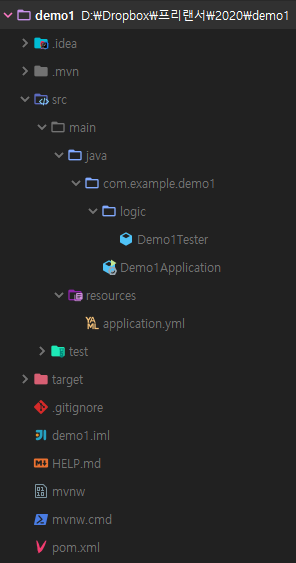
2.1. 폴더구성

  • 실행을 위한 Demo1Application.java가 존재
  • application.yml의 값을 가져오기 위한 Demo1Tester.java가 위치

2.2. pom.xml

1
2
3
4
5
6
7
8
9
10
11
12
13
14
15
16
17
18
19
20
21
22
23
24
25
26
27
28
29
30
31
32
33
34
35
36
37
38
39
40
41
42
43
44
45
46
47
48
49
50
51
52
53
54
<?xml version="1.0" encoding="UTF-8"?>
<project xmlns="http://maven.apache.org/POM/4.0.0" xmlns:xsi="http://www.w3.org/2001/XMLSchema-instance"
xsi:schemaLocation="http://maven.apache.org/POM/4.0.0 https://maven.apache.org/xsd/maven-4.0.0.xsd">
<modelVersion>4.0.0</modelVersion>
<parent>
<groupId>org.springframework.boot</groupId>
<artifactId>spring-boot-starter-parent</artifactId>
<version>2.2.2.RELEASE</version>
<relativePath/> <!-- lookup parent from repository -->
</parent>
<groupId>com.example</groupId>
<artifactId>demo1</artifactId>
<version>0.0.1-SNAPSHOT</version>
<name>demo1</name>
<description>Demo project for Spring Boot</description>

<properties>
<java.version>1.8</java.version>
</properties>

<dependencies>
<dependency>
<groupId>org.springframework.boot</groupId>
<artifactId>spring-boot-starter</artifactId>
</dependency>

<dependency>
<groupId>org.projectlombok</groupId>
<artifactId>lombok</artifactId>
<optional>true</optional>
</dependency>
<dependency>
<groupId>org.springframework.boot</groupId>
<artifactId>spring-boot-starter-test</artifactId>
<scope>test</scope>
<exclusions>
<exclusion>
<groupId>org.junit.vintage</groupId>
<artifactId>junit-vintage-engine</artifactId>
</exclusion>
</exclusions>
</dependency>
</dependencies>

<build>
<plugins>
<plugin>
<groupId>org.springframework.boot</groupId>
<artifactId>spring-boot-maven-plugin</artifactId>
</plugin>
</plugins>
</build>

</project>

lombok 이외에는 특별한거 하나 없는 intellij 기본 생성 Spring Boot Application이다.

2.3. application.yml

test.example.value 의 값으로 demo1을 세팅한다.

1
2
3
test:
example:
value: demo1

2.4. Demo1Tester.java

application.yml의 값을 가져오기 위한 Class
Autowired 테스트를 위해 @Component로 선언한다.

1
2
3
4
5
6
7
8
9
10
import lombok.Data;
import org.springframework.beans.factory.annotation.Value;
import org.springframework.stereotype.Component;

@Data
@Component
public class Demo1Tester {
@Value("${test.example.value}")
private String value;
}

2.5. Demo1Application.java

Demo1Tester를 autowired 한 뒤 value 의 값을 가져와 log로 출력한다.

1
2
3
4
5
6
7
8
9
10
11
12
13
14
15
16
17
18
19
20
21
22
23
24
25
26
import com.example.demo1.logic.Demo1Tester;
import lombok.extern.slf4j.Slf4j;
import org.springframework.beans.factory.annotation.Autowired;
import org.springframework.boot.CommandLineRunner;
import org.springframework.boot.SpringApplication;
import org.springframework.boot.autoconfigure.SpringBootApplication;

@Slf4j
@SpringBootApplication
public class Demo1Application implements CommandLineRunner {

private final Demo1Tester tester;

public Demo1Application(Demo1Tester tester) {
this.tester = tester;
}

public static void main(String[] args) {
SpringApplication.run(Demo1Application.class, args);
}

@Override
public void run(String... args) throws Exception {
log.info("demo1 : tester.getValue() : {}", tester.getValue());
}
}

2.6. Demo1 실행결과

1
2
3
4
5
6
7
8
9
10
11
12
  .   ____          _            __ _ _
/\\ / ___'_ __ _ _(_)_ __ __ _ \ \ \ \
( ( )\___ | '_ | '_| | '_ \/ _` | \ \ \ \
\\/ ___)| |_)| | | | | || (_| | ) ) ) )
' |____| .__|_| |_|_| |_\__, | / / / /
=========|_|==============|___/=/_/_/_/
:: Spring Boot :: (v2.2.2.RELEASE)

2020-01-03 22:53:54.010 INFO 20040 --- [ main] com.example.demo1.Demo1Application : Starting Demo1Application on park-PC with PID 20040 (started by park in D:\Dropbox\프리랜서\2020\demo1)
2020-01-03 22:53:54.014 INFO 20040 --- [ main] com.example.demo1.Demo1Application : No active profile set, falling back to default profiles: default
2020-01-03 22:53:54.752 INFO 20040 --- [ main] com.example.demo1.Demo1Application : Started Demo1Application in 1.351 seconds (JVM running for 5.656)
2020-01-03 22:53:54.754 INFO 20040 --- [ main] com.example.demo1.Demo1Application : tester.getValue() : demo1

demo1이 출력되는 것을 확인할 수 있다.

2.7. Demo1 packaging

Spring Boot의 repackage를 스킵하도록 한다.

1
2
3
4
5
6
7
8
9
10
11
12
13
14
15
16
17
18
19
20
21
22
23
24
25
26
27
28
29
30
31
32
33
34
35
36
37
38
39
40
41
42
43
44
45
> mvn clean install -DskipTests -Dspring-boot.repackage.skip=true
[INFO] Scanning for projects...
[INFO]
[INFO] -------------------------< com.example:demo1 >--------------------------
[INFO] Building demo1 0.0.1-SNAPSHOT
[INFO] --------------------------------[ jar ]---------------------------------
[INFO]
[INFO] --- maven-clean-plugin:3.1.0:clean (default-clean) @ demo1 ---
[INFO] Deleting D:\Dropbox\프리랜서\2020\demo1\target
[INFO]
[INFO] --- maven-resources-plugin:3.1.0:resources (default-resources) @ demo1 ---
[INFO] Using 'UTF-8' encoding to copy filtered resources.
[INFO] Copying 1 resource
[INFO] Copying 0 resource
[INFO]
[INFO] --- maven-compiler-plugin:3.8.1:compile (default-compile) @ demo1 ---
[INFO] Changes detected - recompiling the module!
[INFO] Compiling 2 source files to D:\Dropbox\프리랜서\2020\demo1\target\classes
[INFO]
[INFO] --- maven-resources-plugin:3.1.0:testResources (default-testResources) @ demo1 ---
[INFO] Using 'UTF-8' encoding to copy filtered resources.
[INFO] skip non existing resourceDirectory D:\Dropbox\프리랜서\2020\demo1\src\test\resources
[INFO]
[INFO] --- maven-compiler-plugin:3.8.1:testCompile (default-testCompile) @ demo1 ---
[INFO] Changes detected - recompiling the module!
[INFO] Compiling 1 source file to D:\Dropbox\프리랜서\2020\demo1\target\test-classes
[INFO]
[INFO] --- maven-surefire-plugin:2.22.2:test (default-test) @ demo1 ---
[INFO] Tests are skipped.
[INFO]
[INFO] --- maven-jar-plugin:3.1.2:jar (default-jar) @ demo1 ---
[INFO] Building jar: D:\Dropbox\프리랜서\2020\demo1\target\demo1-0.0.1-SNAPSHOT.jar
[INFO]
[INFO] --- spring-boot-maven-plugin:2.2.2.RELEASE:repackage (repackage) @ demo1 ---
[INFO]
[INFO] --- maven-install-plugin:2.5.2:install (default-install) @ demo1 ---
[INFO] Installing D:\Dropbox\프리랜서\2020\demo1\target\demo1-0.0.1-SNAPSHOT.jar to C:\Users\park\.m2\repository\com\example\demo1\0.0.1-SNAPSHOT\demo1-0.0.1-SNAPS
HOT.jar
[INFO] Installing D:\Dropbox\프리랜서\2020\demo1\pom.xml to C:\Users\park\.m2\repository\com\example\demo1\0.0.1-SNAPSHOT\demo1-0.0.1-SNAPSHOT.pom
[INFO] ------------------------------------------------------------------------
[INFO] BUILD SUCCESS
[INFO] ------------------------------------------------------------------------
[INFO] Total time: 24.001 s
[INFO] Finished at: 2020-01-03T22:55:24+09:00
[INFO] ------------------------------------------------------------------------

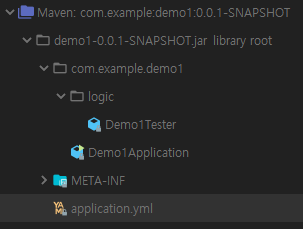
2.8. Demo1.jar

application.yml 이 포함되었음을 확인할 수 있다.

3. Demo2

Demo1에 의존성을 가지고 있는 Demo2를 생성한다.

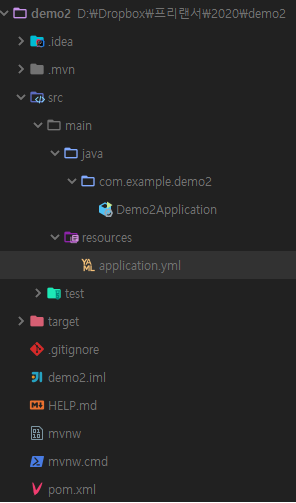
3.1. 폴더구성

  • 실행을 위한 Demo2Application.java가 존재
  • 여러가지 케이스 테스트를 위한 application.yml 존재

3.2. pom.xml

demo1 의 라이브러리를 dependency에 추가한다.

1
2
3
4
5
6
7
8
9
10
11
12
13
14
15
16
17
18
19
20
21
22
23
24
25
26
27
28
29
30
31
32
33
34
35
36
37
38
39
40
41
42
43
44
45
46
47
48
49
50
51
52
53
54
55
56
57
58
59
<?xml version="1.0" encoding="UTF-8"?>
<project xmlns="http://maven.apache.org/POM/4.0.0" xmlns:xsi="http://www.w3.org/2001/XMLSchema-instance"
xsi:schemaLocation="http://maven.apache.org/POM/4.0.0 https://maven.apache.org/xsd/maven-4.0.0.xsd">
<modelVersion>4.0.0</modelVersion>
<parent>
<groupId>org.springframework.boot</groupId>
<artifactId>spring-boot-starter-parent</artifactId>
<version>2.2.2.RELEASE</version>
<relativePath/> <!-- lookup parent from repository -->
</parent>
<groupId>com.example</groupId>
<artifactId>demo2</artifactId>
<version>0.0.1-SNAPSHOT</version>
<name>demo2</name>
<description>Demo project for Spring Boot</description>

<properties>
<java.version>1.8</java.version>
</properties>

<dependencies>
<dependency>
<groupId>org.springframework.boot</groupId>
<artifactId>spring-boot-starter</artifactId>
</dependency>
<dependency>
<groupId>com.example</groupId>
<artifactId>demo1</artifactId>
<version>0.0.1-SNAPSHOT</version>
</dependency>

<dependency>
<groupId>org.projectlombok</groupId>
<artifactId>lombok</artifactId>
<optional>true</optional>
</dependency>
<dependency>
<groupId>org.springframework.boot</groupId>
<artifactId>spring-boot-starter-test</artifactId>
<scope>test</scope>
<exclusions>
<exclusion>
<groupId>org.junit.vintage</groupId>
<artifactId>junit-vintage-engine</artifactId>
</exclusion>
</exclusions>
</dependency>
</dependencies>

<build>
<plugins>
<plugin>
<groupId>org.springframework.boot</groupId>
<artifactId>spring-boot-maven-plugin</artifactId>
</plugin>
</plugins>
</build>

</project>

3.3. Demo2Application.java

@ComponentScan 으로 demo1의 @Component를 탐색한다.
Demo1Tester Class를 Autowired 한다.
value 값을 출력한다.

1
2
3
4
5
6
7
8
9
10
11
12
13
14
15
16
17
18
19
20
21
22
23
24
25
26
27
28
import com.example.demo1.logic.Demo1Tester;
import lombok.extern.slf4j.Slf4j;
import org.springframework.beans.factory.annotation.Autowired;
import org.springframework.boot.CommandLineRunner;
import org.springframework.boot.SpringApplication;
import org.springframework.boot.autoconfigure.SpringBootApplication;
import org.springframework.context.annotation.ComponentScan;

@Slf4j
@SpringBootApplication
@ComponentScan(basePackages = {"com.example.demo1", "com.example.demo2"})
public class Demo2Application implements CommandLineRunner {

private final Demo1Tester tester;

public Demo2Application(Demo1Tester tester) {
this.tester = tester;
}

public static void main(String[] args) {
SpringApplication.run(Demo2Application.class, args);
}

@Override
public void run(String... args) throws Exception {
log.info("demo2 : tester.getValue() : {}", tester.getValue());
}
}

4. 결과

4.1. 시나리오1

기본실행

  • Demo2 application.yml 삭제 (null)
  • Demo2Application 실행
1
2
3
4
5
2020-01-04 00:10:06.508  INFO 2968 --- [           main] com.example.demo2.Demo2Application       : Starting Demo2Application on park-PC with PID 2968 (started by park in D:\Dropbox\프리랜서\2020\demo2)
2020-01-04 00:10:06.514 INFO 2968 --- [ main] com.example.demo2.Demo2Application : No active profile set, falling back to default profiles: default
2020-01-04 00:10:07.687 INFO 2968 --- [ main] com.example.demo2.Demo2Application : Started Demo2Application in 1.853 seconds (JVM running for 3.188)
2020-01-04 00:10:07.693 INFO 2968 --- [ main] com.example.demo2.Demo2Application : demo2 : tester.getValue() : demo1
2020-01-04 00:10:07.695 INFO 2968 --- [ main] com.example.demo1.Demo1Application : demo1 : tester.getValue() : demo1

demo1과 demo2의 값이 demo1로 출력되는 것을 확인.
demo1 : tester.getValue 은 demo2에 포함되는 코드가 아님에도 출력됐음을 확인.

4.2. 시나리오2

  • Demo2에 application.yml 추가 (empty)
  • Demo2Application 실행
1
2
3
4
5
6
7
8
9
2020-01-04 00:16:29.628  INFO 14512 --- [           main] com.example.demo2.Demo2Application       : Starting Demo2Application on park-PC with PID 14512 (started by park in D:\Dropbox\프리랜서\2020\demo2)
2020-01-04 00:16:29.636 INFO 14512 --- [ main] com.example.demo2.Demo2Application : No active profile set, falling back to default profiles: default
2020-01-04 00:16:30.569 WARN 14512 --- [ main] s.c.a.AnnotationConfigApplicationContext : Exception encountered during context initialization - cancelling refresh attempt: org.springframework.beans.factory.UnsatisfiedDependencyException: Error creating bean with name 'demo2Application': Unsatisfied dependency expressed through constructor parameter 0; nested exception is org.springframework.beans.factory.BeanCreationException: Error creating bean with name 'demo1Tester': Injection of autowired dependencies failed; nested exception is java.lang.IllegalArgumentException: Could not resolve placeholder 'test.example.value' in value "${test.example.value}"
2020-01-04 00:16:30.583 INFO 14512 --- [ main] ConditionEvaluationReportLoggingListener :

Error starting ApplicationContext. To display the conditions report re-run your application with 'debug' enabled.
2020-01-04 00:16:30.623 ERROR 14512 --- [ main] o.s.boot.SpringApplication : Application run failed

org.springframework.beans.factory.UnsatisfiedDependencyException: Error creating bean with name 'demo2Application': Unsatisfied dependency expressed through constructor parameter 0; nested exception is org.springframework.beans.factory.BeanCreationException: Error creating bean with name 'demo1Tester': Injection of autowired dependencies failed; nested exception is java.lang.IllegalArgumentException: Could not resolve placeholder 'test.example.value' in value "${test.example.value}"

test.example.value 값이 존재하지 않아 Spring boot 실행 시 에러 발생

4.3. 시나리오3

  • Demo2에 application.yml에 값 추가
  • Demo2Application 실행

demo2/application.yml

1
2
3
test:
example:
value: demo2

결과

1
2
3
4
5
2020-01-04 00:18:22.742  INFO 19544 --- [           main] com.example.demo2.Demo2Application       : Starting Demo2Application on park-PC with PID 19544 (started by park in D:\Dropbox\프리랜서\2020\demo2)
2020-01-04 00:18:22.750 INFO 19544 --- [ main] com.example.demo2.Demo2Application : No active profile set, falling back to default profiles: default
2020-01-04 00:18:23.970 INFO 19544 --- [ main] com.example.demo2.Demo2Application : Started Demo2Application in 1.969 seconds (JVM running for 3.285)
2020-01-04 00:18:23.973 INFO 19544 --- [ main] com.example.demo2.Demo2Application : demo2 : tester.getValue() : demo2
2020-01-04 00:18:23.974 INFO 19544 --- [ main] com.example.demo1.Demo1Application : demo1 : tester.getValue() : demo2

demo1과 demo2의 값이 demo2로 출력되는 것을 확인.
demo1 : tester.getValue 은 demo2에 포함되는 코드가 아님에도 출력됐음을 확인.

4.4. 결론

  • jar 내부 application.yml@ComponentScan 시 값이 읽힐 수 있다.
    • 다만 jar를 import 하는 application의 application.yml이 아예 존재하지 않아야 한다.
  • 실행되는 application에 application.yml 설정파일이 존재한다면 jar내부의 application.yml무시된다.
    • 실행되는 application의 application.yml 내부 값이 적용된다.

5. 추가

  • @ComponentScan 시 basePackages 설정에 대한 고민

위의 테스트에서 자꾸 demo2에 포함되지 않는 demo1의 코드가 실행되는 것을 알 수 있다. 이는 @ComponentScan의 basePackages에 com.example.demo1 로 설정되어있기 때문이다. (원하지 않는 Demo1Application이 실행될 수 있다는 이야기다.)
따라서 다른 Application의 Component를 사용할 경우에는 최소한의 범위로 선언해서 사용할 수 있도록 해야한다.

@ComponentScan(basePackages = {"com.example.demo2", "com.example.demo1.logic"})

1
2
3
4
2020-01-04 00:23:49.949  INFO 10644 --- [           main] com.example.demo2.Demo2Application       : Starting Demo2Application on park-PC with PID 10644 (started by park in D:\Dropbox\프리랜서\2020\demo2)
2020-01-04 00:23:49.954 INFO 10644 --- [ main] com.example.demo2.Demo2Application : No active profile set, falling back to default profiles: default
2020-01-04 00:23:51.010 INFO 10644 --- [ main] com.example.demo2.Demo2Application : Started Demo2Application in 1.862 seconds (JVM running for 3.134)
2020-01-04 00:23:51.012 INFO 10644 --- [ main] com.example.demo2.Demo2Application : demo2 : tester.getValue() : demo2

com.example.demo1.logic 으로 선언했을 경우 Demo1Application 이 실행되지 않는것을 확인할 수 있다.